

Your cart is currently empty!


SAMSUNG Galaxy Tab S10 FE 128GB WiFi Android Tablet, Large Display, Long Battery Life, Exynos 1580 Processor, IP68 Water-Resistant, 90 Hz Refresh, S Pen for Note-Taking, US Version, Silver : Electronics



SAMSUNG Galaxy Tab S10 FE 128GB WiFi Android Tablet, Large Display, Long Battery Life, Exynos 1580 Processor, IP68 Water-Resistant, 90 Hz Refresh, S Pen for Note-Taking, US Version, Silver : Electronics
429.99$
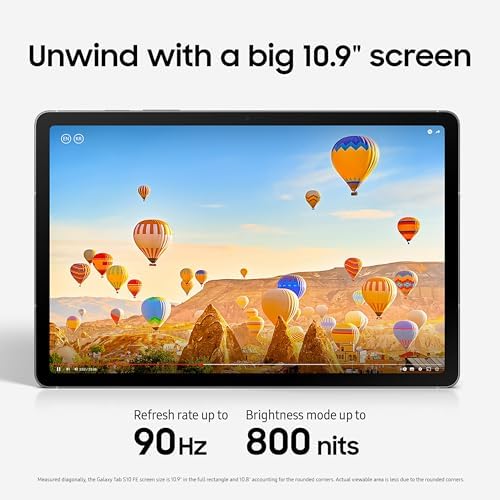
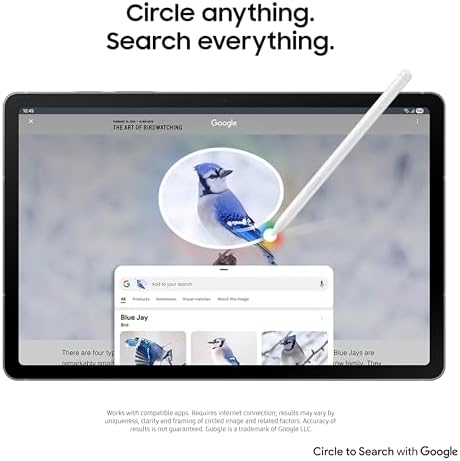
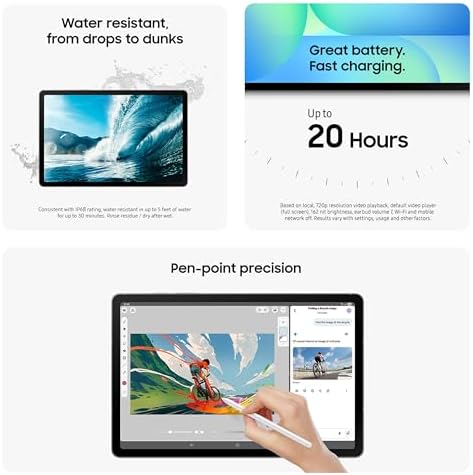
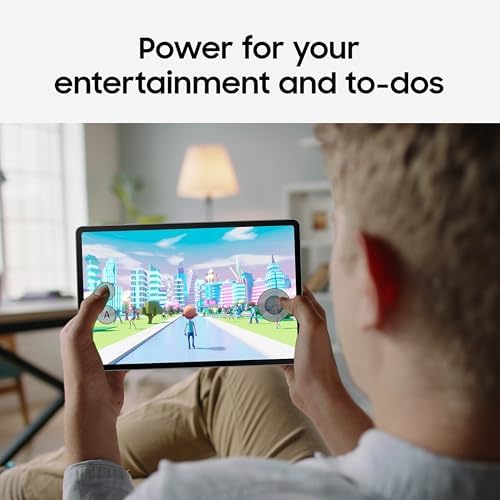
About this item UNWIND WITH A BIG SCREEN: Kick back and relax with big, bright screens.¹ See every detail of your favorite shows, and get closer to the action on your favorite games with 90hz refresh rate. Plus, dual speakers make everything sound amazing. CIRCLE ANYTHING. SEARCH EVERYTHING: With Galaxy Tab S10 FE Series, you can simply circle anything on your screen to easily get search results on the spot using Circle to Search with Google.² HANDWRITING ASSIST MAKES YOUR UNTIDY NOTES NEAT: Tidy up your handwritten notes with Handwriting Assist.³ It easily straightens, aligns and adjusts the spacing of your words to create neater notes. DOES THE MATH FOR YOU: Make the grades using Math Solver.⁴ Simply use your S Pen to write out an equation on your screen. Math Solver can clean up your equations by turning them into text, just like that. WATER RESISTANT, FROM DROPS TO DUNKS: From droplets to splashes to full immersion in water, Galaxy Tab S10 FE Series is dependably durable.⁵ POWER FOR YOUR ENTERTAINMENT AND TO-DOS: Get big Galaxy power for fast-paced gaming, casual multitasking and everything in between with a powerful processor that delivers rich, smooth experiences. PEN-POINT PRECISION: Write up to-do lists by hand, or enjoy drawing during your free time. S Pen features a responsive design that feels like you’re writing on actual paper so nothing gets in your way when your imagination is flowing.
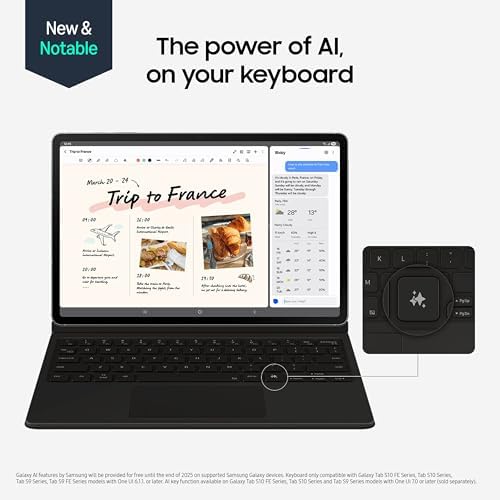
GREAT BATTERY. FAST CHARGING: Keep your time to unwind powered with a long-lasting battery for up to 20 hours.⁶ And when you do need to power up, do it quickly and keep going with Super Fast Charging.⁷ THE POWER OF AI, ON YOUR KEYBOARD: Tap into the power of AI using the quick access hot key on our tablet keyboard.⁸ BIG BACKUP-ABILITY: Have plenty of room for your files with up to 256GB⁹ of storage. Add up to 1 TB more with a microSD card.¹⁰ Show more › See more product details
Description
Step up your tablet game with Galaxy Tab S10 FE Series. The perfect downtime tablets, Tab S10 FE Series gives you just the right mix of innovative Galaxy features that you need to manage your lifestyle.¹ Whether you’re working on your weekly calendar or kicking back with your favorite entertainment, you’ll have plenty of room to do what you need on their big, beautiful screens. Need to find something fast? Use Circle to Search with Google² to search anything you see on-screen in a snap, whether it’s that cool pair of shoes your favorite influencer was wearing or that tasty-looking pastry your bestie posted on their story. They’re built to last too, with IP68 water and dust resistance that make them some of the most durable tablets on the market.³ Plus, these tablets let you go for hours⁴ with powerful, fast-charging batteries⁵ that have your back. Once you have a Galaxy Tab S10 FE Series tablet, you’ll wonder how you ever lived without it.
¹Galaxy AI features by Samsung will be provided for free until the end of 2025 on supported Samsung Galaxy devices. ²Works with compatible apps. Requires internet connection; results may vary by uniqueness, clarity and framing of circled image and related factors. Accuracy of results is not guaranteed. Google is a trademark of Google LLC. ³Consistent with IP68 rating, water resistant in up to 5 feet of water for up to 30 minutes. Rinse residue/dry after wet. ⁴Based on local, 720p resolution playback, default video player (full screen), 162 nit brightness, earbud volume 7, Wi-Fi and mobile network off. Results vary with settings, usage and other factors. ⁵Requires 45W wall charger (sold separately). Use only Samsung-approved charger and USB-C cable. To avoid injury or damage to your device, do not use incompatible, worn or damaged batteries, chargers or cables.
Additional information
| Color | Gray, Silver, Blue |
|---|---|
| Size | 256 GB, 128 GB |
| Style | S10 FE+, S10 FE |
| Pattern Name | Tablet + Book Cover, Tablet Only |
| Brand | SAMSUNG |
| Model Name | Galaxy Tab S10 FE |
| Generation | 10th Generation |
| Model Year | 2025 |
| Age Range Description | Adult |
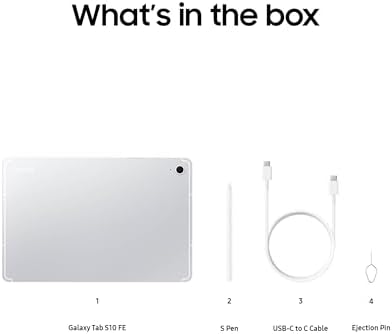
| Built-In Media | Data Cable, Ejection Pin, Quick Start Guide, S-Pen, Tablet |
| Model Number | SM-X520NZSNXAR |
| Specific Uses For Product | Entertainment, Kids, Student |
| UPC | 198957102257 |
| Manufacturer | SAMSUNG |
| Customer Reviews | 4.6 4.6 out of 5 stars (234) var dpAcrHasRegisteredArcLinkClickAction; P.when('A', 'cf').execute(function(A) { 4.6 out of 5 stars |
| Best Sellers Rank | #6,087 in Electronics (See Top 100 in Electronics) #166 in Computer Tablets |
| ASIN | B0DVZSRJ8Q |
| Item Height | 0.24 inches |
| Warranty Description | 2 Year Manufacturer |
| Memory Storage Capacity | 128 GB |
| RAM Memory Installed | 8 GB |
| Hardware Interface | Bluetooth, USB Type C |
| Wireless Technology | Bluetooth, Wi-Fi |
| Cellular Technology | 4G, 5G |
| Connectivity Technology | Bluetooth, USB, Wi-Fi |
| Wireless Compability | 802.11ac |
| Video Capture Resolution | 4K UHD 2160p |
| Camera Description | Front, Rear |
| Rear Facing Camera Photo Sensor Resolution | 13 MP |
| Operating System | Android |
| Video Processor | Samsung |
| Item Weight | 1.2 Pounds |
| Item Dimensions L x W x Thickness | 10.01"L x 6.53"W x 0.24"Th |
| Human-Interface Input | Touchscreen with Stylus Support |
| Graphics Description | Integrated |
| Compatible Devices | Headphones |
| Warranty Type | Limited |
| Screen Size | 10.9 Inches |
| Display Resolution Maximum | 2304 x 1440 Pixels |
| Display Type | LCD |
| Native Resolution | 2304 x 1440 pixels |
| Aspect Ratio | 16:10 |
| Display Refresh Rate in Hertz | 90 |
| Battery Average Life | 20 Hours |
| Battery Capacity | 8000 Milliamp Hours |
| Battery Cell Type | Lithium Ion |
| Battery Power | 29.95 Watt Hours |
| Lithium-Battery Energy Content | 29.95 Watt Hours |
| Processor Speed | 1.9, 2.6, 2.9 GHz |
| Processor Description | Exynos 1580 |
| Processor Brand | Samsung |
| CPU Model Number | Samsung Exynos 1580 (S5E8855) |
| Other Special Features of the Product | Fast Charging, Stylus Support |
| Feature | BIG BACKUP-ABILITY: Have plenty of room for your files with up to 256GB⁹ of storage. Add up to 1 TB more with a microSD card.¹⁰ |
10 reviews for SAMSUNG Galaxy Tab S10 FE 128GB WiFi Android Tablet, Large Display, Long Battery Life, Exynos 1580 Processor, IP68 Water-Resistant, 90 Hz Refresh, S Pen for Note-Taking, US Version, Silver : Electronics
Related Products
-

AD Beads Handmade Gemstone Stretch Elastic Bracelet Crystal Healing Reiki Nature’s Beauty and Spiritual Essence Unisex (4mm, Black Tourmaline (Best protection)) : Handmade Products
7.99$ -
Anker USB C Hub, 5-in-1 USBC to HDMI Splitter with 4K Display, 1 x Powered USB-C 5Gbps & 2×Powered USB-A 3.0 5Gbps Data Ports for MacBook Pro, MacBook Air, Dell and More : Electronics
24.99$ -
Apple 2025 MacBook Air 13-inch Laptop with M4 chip: Built for Apple Intelligence, 13.6-inch Liquid Retina Display, 16GB Unified Memory, 256GB SSD Storage, 12MP Center Stage Camera, Touch ID; Midnight : Electronics
879.40$ -
ARTIX CL750 Wired Headphones with Mic & Volume Control — Noise Isolating On-Ear Headphones for Computer and Laptop Wired, Plug in Corded Headphone Over Ear with Wire (Foldable, Aux Jack 3.5mm) : Electronics
33.56$
Kindle Customer –
Super impressed
Absolutely in love with this. It’s perfect for note-taking, and it reflects my handwriting pretty well. Speed is good, responsive, and lightweight. My only little gripe is that the cover that I got with it is a little fussy when trying to get it to hold the tablet up to use the keyboard; once I get it, it holds, but it’s just a little difficult to get it to that point. (*Edit: The case is fine. It was user error. 😂 ) The tablet itself is great though. Really responsive, quick, clear screen, and the sound is really good quality. Sad that it doesn’t have a headphone jack, but I didn’t notice when I bought it and it’s not critical. Battery life is really good, too. When using it consistently, I need to charge it after about 2 days, maybe 3. Otherwise, it holds a charge for about 4-5 days. Perfect for school, which is what I bought it for.
2 people found this helpful
Spyder1384Spyder1384 –
Samsung exceeds expectations!
Samsung never ceases to amaze me with their innovation. The design has a premium feel to it and excellent touch responsiveness. It charges surprisingly quick compared to what I was expecting (my chargers are 30w and 45w). Battery life is pretty solid also. I typically charge daily, but I could easily get 2 solid days worth of Battery life for how much I use it. The speakers are also prrtty good for a tablet and have a surprising range of sound depth. The S-pen is actually my biggest reason for going with an “S” series tablet and it doesn’t disappoint. The pen accuracy is great and allows me to navigate apps or take notes easily. Palm rejection when using the pen works flawlessly as well. The more I look into it, I keep finding new features that, even as a long time Samsung user, are innovative and helpful.
12 people found this helpful
W. Lee –
Ideal Android tablet
My wife was jealous of my Galaxy Tab S8. She had an older iPad given by a daughter. She didn’t like it, because she’s used to Android, and the i*** universe is quite different. I eventually had to give in and buy her an S10.The tablet closely matches the size of a book or paper, but with very high resolution. It responds quickly. She still hasn’t figured out all of the features. After the tech support person (me) configured it, she was completely happy.It supports a micro SD of up to a terabyte if the included storage isn’t enough. My wife stores lots of pictures on the tablet, so we had to add an SD.There are a few things I’d have differently:* In the ‘old days’, the side power button when held down allowed restart/shutdown. All recent Samsung phones and tablets use the awkward side button and volume down simultaneously for the same functionality.* There is some bloatware included, but most of them we are able to uninstall.* Samsung likes their Bixby for AI. I prefer Google.
5 people found this helpful
Tanner Throckmorton –
Solid Tablet
So far I love it. Runs smoothly and connects well with my galaxy s24Ultra. Fair price. Great refresh rate and display quality.
brijhauna –
I love this
I’ve been researching tablets for months, and the Galaxy Tab S10 FE exceeded my expectations. The large display makes watching videos, browsing, and multitasking a joy. The 90 Hz refresh rate keeps everything smooth, and the battery lasts all day without worrying.The S Pen is amazing for note-taking and drawing, and the tablet’s performance with the Exynos 1580 processor feels fast and responsive. I also love that it’s IP68 water-resistant—peace of mind for everyday life!Overall, this tablet combines style, performance, and practicality. If you’re looking for a reliable Android tablet, this is it. I’m so glad I chose it!
One person found this helpful
michael rice –
Handy study tool
Useful tablet, fast and friendly for note-taking
Tousif Ali –
Excellent Tablet for Work and Entertainment!
The Galaxy Tab S10 FE+ is fantastic! The 13.1″ display is vibrant and perfect for streaming and multitasking. It’s fast, the battery lasts all day, and the S Pen is great for notes. Waterproof and durable too—highly recommended!
10 people found this helpful
Melissa –
Just charge a little more (or not) and include the charging block
Met the size, speed and storage that my husband needed for half the price of an apple. Instead, we received a $550 paperweight because it does not come with a charging block which wouldn’t be so much of a problem if it had a USB on the charging end, instead of a c end which does not plug into anything except my laptop. I swore off Samsung products almost 30 years ago when they wouldn’t honor the warranty on a video camera I had purchased. I tried to convince my husband not to purchase this one, but he insisted since it was so much cheaper than the I-Pad he really wanted. “Should have gone with the Apple” was his comment when he realized the only way to charge the tablet was through my laptop.
One person found this helpful
Kenneth Butcher –
It doesn’t come with a charger Samsung is too cheap
I love the tablet it works great but I was very disappointed with Samsung when I had to order a charger for it separately. Considering the price they charge for this tablet you think they could at least include a charger if not a lot of free accessories. But regardless how cheap Samsung is about providing the basic accessories for the tablet the tablet itself is pretty good
One person found this helpful
Whitt –
Good if you’re not using Handwriting or One Note.
I got this tablet for work. I’m a Samsung phone user. I wanted a Samsung/android device so that it would connect to my phone well, text via google messages and the like. It does that part well. It doesn’t do a couple deal breakers at all. What I didn’t like when compared to an iPad Air Tablet.1. The hand writing to text feature isn’t great at all. It’s nowhere near as mature as the Apple version. It has a really hard time recognizing handwriting, dealing with my newfound capitalization issues (I didn’t know I had that problem). It does this annoying thing where it will jump to the line below if your hand writing starts to droop down… It’s really time consuming to correct. It also doesn’t have as many features as the iPad. It does, however, have a convenient erase while squeezing feature, which oddly the IPad/pencil doesn’t have.2. The scroll is backwards!!!!! When using a keyboard with a touch pad, the scroll is backwards – I can’t figure out how to reverse it! It drives me bonkers. There is also not the googleable feature about how to reverse it in the settings – it doesn’t exist in this system. It is dumb to have such a nice machine and immediately hamstring it.3. One Note sucks in Android (not really a knock on this tablet though). But for me, I got this table mainly for the ability to take notes and communicate through One Note with my team, make collaborative engineering drawings and the like. The One Note app in android stinks! You can’t hand writing to text in it easily – except for the terrible Samsung hand writing to text feature. Compared to the iOS version of One Note, it’s not nearly as capable in terms of other features, how the note manager displays notes (the iOS version has a preview, for example). It’s soooo much better.Generally, if I didn’t need it for One Note, I probably would have kept it and not trialed the iPad. It’s a solid tablet. I liked the Dex feature, which models the whole tablet after a windows PC. It’s comfortable, except that EVERY SINGLE WINDOW is opened in medium sized, that you have to move to full screen…. I couldn’t find the setting to change that one either… Like why??? You’re almost there, then trip at the finish line…. Why?The iPad is a bit more expensive, and it’s Apple, which is not my cup of tea, but for me, it’s a better purchase. For what it’s worth, I liked the Samsung tablet off brand case selection more than the iPad’s case selection, which is sort of ironic.
5 people found this helpful