

Your cart is currently empty!


Anker USB C Hub, 5-in-1 USBC to HDMI Splitter with 4K Display, 1 x Powered USB-C 5Gbps & 2×Powered USB-A 3.0 5Gbps Data Ports for MacBook Pro, MacBook Air, Dell and More : Electronics




Anker USB C Hub, 5-in-1 USBC to HDMI Splitter with 4K Display, 1 x Powered USB-C 5Gbps & 2×Powered USB-A 3.0 5Gbps Data Ports for MacBook Pro, MacBook Air, Dell and More : Electronics
24.99$
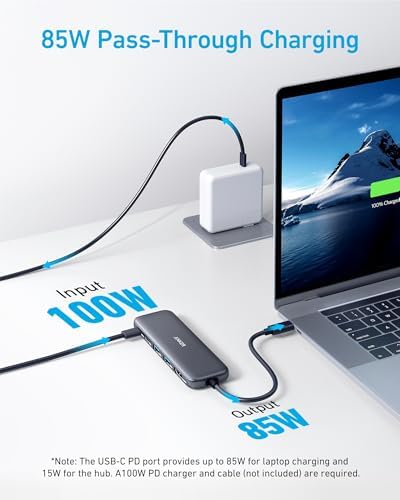
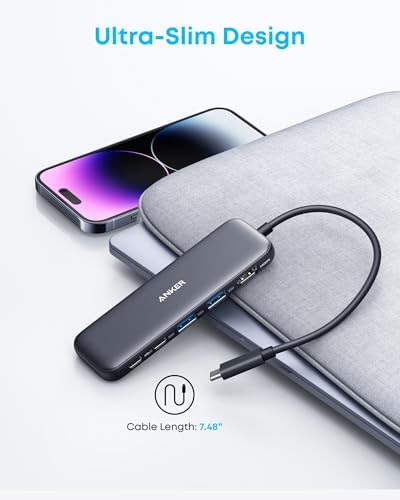
About this item 5-in-1 Connectivity: Equipped with a 4K HDMI port, a 5 Gbps USB-C data port, two 5 Gbps USB-A ports, and a USB C 100W PD-IN port. Note: The USB C 100W PD-IN port supports only charging and does not support data transfer devices such as headphones or speakers. Powerful Pass-Through Charging: Supports up to 85W pass-through charging so you can power up your laptop while you use the hub. Note: Pass-through charging requires a charger (not included). Note: To achieve full power for iPad, we recommend using a 45W wall charger. Transfer Files in Seconds: Move files to and from your laptop at speeds of up to 5 Gbps via the USB-C and USB-A data ports. Note: The USB C 5Gbps Data port does not support video output. HD Display: Connect to the HDMI port to stream or mirror content to an external monitor in resolutions of up to 4K@30Hz. Note: The USB-C ports do not support video output. What You Get: Anker 332 USB-C Hub (5-in-1), welcome guide, our worry-free 18-month warranty, and friendly customer service. Compatibility: Supports USB-C, USB4, and Thunderbolt connections. Compatible with MacBook (macOS 12 and newer), Windows 10 and 11, ChromeOS, and laptops equipped with DP Alt Mode and Power Delivery. Note: This device is not compatible with Linux.
› See more product details
Description
From the brand

-

We want you to live without the inconvenience and uncertainty of where your next charge is coming from.
Our chargers and accessories don’t just power up your devices, they offer the tech experience you want with zero restrictions.
-


Fast access to today’s prime
-


Power to Drive Your Prime
-


Ultimate Power to Keep Giving
-


Doubly Fast in a Snap
-


Pro Fast Charging in a Nano
-


Anker’s Sustainability Plan
-


Get Powered Up Now
-


Series 7 I Future Technology
-


Series 5 I Higher Quality
-


Series 6 I Unique Experiences
-

Additional information
| Color | Blue, Grey, Black, White, Green |
|---|---|
| Hardware Interface | USB Type C |
| Additional Features | HDMI™️ |
| Compatible Devices | Windows and MacBook computers that support USB-C with DP Alt Mode and Power Delivery, as well as USB4 and Thunderbolt 3/4/5 ports. |
| Total Usb Ports | 3 |
| Data Transfer Rate | 5 Gigabits Per Second |
| Number of Ports | 5 |
| Operating System | Chrome OS, Windows 10, Windows 7 |
| Item Dimensions L x W x H | 4.78"L x 1.59"W x 0.45"H |
| Item Weight | 1.44 ounces |
| Brand | Anker |
| Manufacturer | Anker |
| UPC | 194644101237 194644121358 |
| Customer Reviews | 4.4 4.4 out of 5 stars (13,855) var dpAcrHasRegisteredArcLinkClickAction; P.when('A', 'cf').execute(function(A) { 4.4 out of 5 stars |
| Best Sellers Rank | #2 in Computers & Accessories (See Top 100 in Computers & Accessories) #1 in Laptop Docking Stations |
| ASIN | B0BQLLB61B |
| Item Height | 11.5 millimeters |
| Warranty Description | 18-month |
| Feature | Compatibility: Supports USB-C, USB4, and Thunderbolt connections. Compatible with MacBook (macOS 12 and newer), Windows 10 and 11, ChromeOS, and laptops equipped with DP Alt Mode and Power Delivery. Note: This device is not compatible with Linux. |
10 reviews for Anker USB C Hub, 5-in-1 USBC to HDMI Splitter with 4K Display, 1 x Powered USB-C 5Gbps & 2×Powered USB-A 3.0 5Gbps Data Ports for MacBook Pro, MacBook Air, Dell and More : Electronics
Related Products
-

Apple 2025 MacBook Air 13-inch Laptop with M4 chip: Built for Apple Intelligence, 13.6-inch Liquid Retina Display, 16GB Unified Memory, 256GB SSD Storage, 12MP Center Stage Camera, Touch ID; Midnight : Electronics
879.40$ -
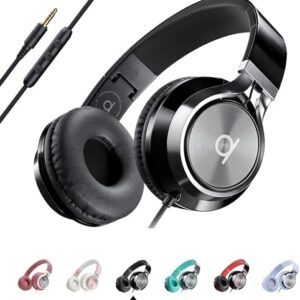
ARTIX CL750 Wired Headphones with Mic & Volume Control — Noise Isolating On-Ear Headphones for Computer and Laptop Wired, Plug in Corded Headphone Over Ear with Wire (Foldable, Aux Jack 3.5mm) : Electronics
33.56$ -
![Car Phone Holder for Magsafe [78+LBS Strongest Suction & 2400gf Magnetic] 360° Adjustable Car Phone Mount, Phone Holders for Your Car for iPhone 17 Pro Max 16 15 14 13 12 Air Plus (Carbon Fiber) : Cell Phones & Accessories](https://shopexclusive.net/wp-content/uploads/2025/09/41zx7xO9LPL._AC_-300x300.jpg)
Car Phone Holder for Magsafe [78+LBS Strongest Suction & 2400gf Magnetic] 360° Adjustable Car Phone Mount, Phone Holders for Your Car for iPhone 17 Pro Max 16 15 14 13 12 Air Plus (Carbon Fiber) : Cell Phones & Accessories
26.99$ -
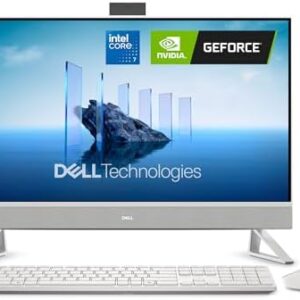
Dell 27 All-in-One Desktop ec27250-27-inch FHD Touch Display, Intel Core 7 Processor 150U, NVIDIA GeForce MX570A 2GB GDDR6 Graphics, 32GB DDR5 RAM, 1TB SSD, Windows 11 Pro, Onsite Service – White : Electronics
1,230.25$
Winnie –
Compact, Travel friendly, Works well with ROG ALLY
This is a compact and well built adapter, and it is travel friendly. I use it for my ROG ALLY when I don’t want it docked and still need charging and other device inputs. It has just about enough ports for what I need, usb-c power delivery port for charging (ROG ALLY can still run at maximum performance using this with a 100W charging brick and a cable that allows 100W power pass through). I use the remaining USB-C port and two USB-A ports for external hard drives or gaming controller 2.4Ghz receiver. Transferring files between ROG ALLY and an external SSD with this adapter is fast, could reach above 380 mb/s. All the device inputs were as advertised, “plug and play”. The hdmi port also gives me an option to connect my ROG ALLY to TV when I don’t have the dock which takes up more space for traveling. One thing to note, you will have to use the USB-C port on your PC which provides more power (usually at the back and not on the front of the pc), if not plugged in to a power source. When I received my first order, I plugged it into the front USB-C port of my mini PC, just for my wired keyboard and mouse, the computer didn’t recognize it and couldn’t get any input from my keyboard and mouse. I returned the first one and thought it wouldn’t work as I expected. A few days later when I was using another Anker 7 in 1 USB-C adapter, I ran into the same issue but I know that adapter had been working well, then I realized I had to plug it into the port on the back of the PC. So I got this again and tried, it just worked like a charm. Hope they actually mentioned it on their product page so I wouldn’t have to return the first one. The cable length on this adapter is just right, not too long or too short when using with ROG ALLY (not hanging, since the cable is pretty sturdy, when I picked up the ROG ALLY, the adapter just comes along).
One person found this helpful
Brianne –
Reliable Hub for My MacBook Air
I bought this Anker USB-C hub for my MacBook Air, and it works flawlessly. The HDMI connection is clear with no lag, and the extra USB ports are a lifesaver for connecting accessories. It’s lightweight, compact, and slips easily into my laptop bag, so I can take it anywhere.The build quality feels solid, and everything connects securely without wiggling or dropping out. I’ve used cheaper hubs before that overheated or lost connection, this one is much more reliable.Overall, this hub makes my MacBook far more versatile, and it’s been perfect for both work and travel. Definitely worth it if you need extra ports and a clean HDMI output.
One person found this helpful
B –
This one supports display but no sd slots. See link for sd w/out display – – both are fantastic
5 ***** for functionality and convenience of adding usb ports to a Surface Pro Laptop.Data transfer rates are fast and the small size of this doesn’t get in the way or take up desk space even if left plugged in.I’d just gotten a new laptop and though I did notice the lack of usb ports, I didn’t notice that my new laptop didn’t have a sd slot (full or micro).I’ve since purchased another version of this item (link at bottom) which has almost everything this does, in addition to a full and a micro sd slot.The main difference is that this item allows for display, and the one with sd slots does not support display.For me, I use the sd more than I do the display, so I use the second one as my main hub and keep this one in my bag as a backup should I ever need the display port. Both are so small and compact that carrying both during travel is as much of an issue as throwing a pack of gum in my bag . . . . a complete nonissue.https://www.amazon.com/dp/B0DXJQT19B?ref=ppx_yo2ov_dt_b_fed_asin_title
2 people found this helpful
Alexander LindoAlexander Lindo –
Decent USB-C Hub
I have always been a fan of Anker products ever since their company was erected. They make great chargers and cables. The Anker 332 USB-C hub appears to be no different. So far, it works well with my M1 MacBook Air. I chose this hub because of its sleek design and lack of SD card and Ethernet ports.The 332 is a 5-in-1 USB-C hub featuring an HDMI port, 2 USB 3.0 ports, 1 USB-C data port, and one USB-C port for power delivery. This is the port that you connect your power adapter for pass-through charging. The hub supports power adapters of up to 100W. However, the 332 requires 15W of power for itself, so be sure that you attach a 45W or greater power adapter if you are using an M1 or an M2 MacBook Air. I discovered this when trying to use the included 30W power adapter that comes with the M1 MacBook Air.When attached through the hub and using the 30W power adapter, only 15W of power was available to the MacBook Air, and thus the battery remained in a “Not Charging” state, and processor-intensive tasks would cause the MacBook Air to consume battery power. Thankfully, I already had an Anker Power Port Atom III 60W power adapter that I was using to charge my previous Non-Retina MacBook Air using a MagSafe2 to USB-C cable.After swapping out the 30W charger for the 60W, 45W of power was now made available to the MacBook Air. As you would expect, charging began instantaneously, and battery power was no longer consumed while connected to the hub.The USB-C and USB-A data ports support transfer speeds of up to 5 Gbps. The HDMI port supports up to 1080p @ 120Hz, 1440p @ 60Hz, and 4K @ 30Hz. Some would prefer to have support for 4K @ 60Hz, but I already knew this going in, and it is a non-issue as I do not currently own a 4K display.I did run into an issue with audio playback over HDMI, whereby audio playback is choppy when the resolution is set to 1080p @ 60Hz. The only remedy is to lower the refresh rate to 50Hz, at which point audio playback is stable. In contrast, audio playback over HDMI is flawless at 1080p @ 60Hz on Apple’s official USB-C Multiport AV Adapter.At 5Gbps, the USB ports are decent on this Anker 332 hub; however, when connecting an external USB 3.0 SSD, this hub showed the following write/read speeds: write ~80MB/s, read 140MB/s as opposed to write ~160MB/s, read 290MB/s when connected directly to the M1 MacBook Air or via Apple’s official USB-C Multiport AV Adapter. The enclosure is entirely made of plastic. I would have preferred an enclosure made of aluminum for better heat dissipation and a more premium aesthetic, but aside from that, it does its job quite well. The hub gets warm but never hot, and thus I’d expect it to last long. It also comes with Anker’s 18-month warranty.
8 people found this helpful
John G. –
This USB Hub works great on Android devices without external power attached.
Many (Android version 15) tablet and phone users are frustrated by only having ONE USB type “C” port to plug stuff into.The ANKER USB hub is the answer to this problem!* NOW you can: Charge, Manage a Flash Drive, use an external mouse or keyboard, plug in USB Headphones etc.ALL at the SAME time!* What I like BEST is that you don’t have to do or know anything (it is simple to use – just plug it in). This makes it usable by friends that don’t understand technology too well.* You do NOT have to have an external power source – it will draw power from your device (within reason of course).* BUT, if you DO plug in an external power source (5VDC,, 2.2Amps), you can CHARGE your device AND use ALL the same USB accessories I listed above (and more).* I liked this device SO MUCH, that I bought a SECOND one just for MYSELF.* Yes, I know it is more than twice as expensive as the elcheapo device, BUT the difference is – IT WORKS GREAT!!* No, I did not have a chance to test the HDMI port, but if it works as well as the rest of the device, I am very confident it will be fine.2025/07/13 JCG
3 people found this helpful
Laurel Clark –
Versatile, compact, and durable.
Perfect for use with my Windows Surface 4 laptop. It has all the outlets I need for a very reasonable price.It gets a little bit warm, but nothing excessive. Anker makes a good product, and I expect this to last a long time.Very compact, and a great purchase.
4 people found this helpful
Stuart Mantel –
Great USB hub.
This hub is great for adding ports to a laptop or desktop. It travels with me everywhere. The small size and light weight make it perfect for mobile users. It is built securely, and is a great value for the money. I haven’t had any compatibility issues with multiple computers, peripherals, and operating systems (Windows, Mac, Linux).
Servo –
It’s not smart enabled
I have a bunch of these hubs and I seem to have bad luck getting one from an unknown company. Even with one from a reputable company the smart versions that are supposed to balance functions comprise security. I tried the standard versions and they all have a problem with using multiple ports can cause a crash or some ports are prioritized over another and that little difference can cause the device not to work on certain devices. Last the manufacturer claims that the speed is what is advertised but in reality it is not. So I saw this one for full range of apple devices and other products and has an onboard smart system which optimizes certain ports and just balances the various ports. No it’s just a hub that is fast compatible with a lot of devices but fails at a certain level of activity. I used it recently for my mac and ipad and whatever updates that were made it is not being seen. So bottom line is it is fast doesn’t have the smart feature and works fine. But a 2019 macbook air and 2019 ipad will not see it anymore. It’s a hub it’s fast but doesn’t balance out the ports data transfer and don’t use during any backups. I have no idea why those apple devices are blind to it but it does work on m1 air and current macbook air fine. Because it has started misbehaving I’m reviewing it. It even started requiring permission for use on windows 11 devices so be aware of these issues it still works. Nothing wrong with it just recently it is being flagged and blocked by some devices.
7 people found this helpful
Gabriela LGabriela L –
Works Flawlessly with Ethernet and Charging
I purchased this along with a charger from the same brand after my barrel charger port stopped working and I was left with only one USB-C port. I needed more ports, and this adapter has been a lifesaver. I bought it with the Anker PD charger, and everything works flawlessly. I was even able to connect my USB-C to Ethernet adapter, and it worked instantly without needing to install any software.The only downside is the limited number of USB-C ports. There’s one for PD charging and another that I’m using for Ethernet, so just two in total.The cord length is perfect for myLaptop & it supplies more than enough power for what I need. No issues with internet speed. I’m happy I purchased this item because it’s versatile enough to be used with other devices too when I upgrade to a new laptop.
heyjay –
Yes!!! More ports!!
N needed something practical for my MacBook Pro since it wonky comes with two USB-C ports. This is great, especially since it has a large enough cord so everything can actually touch the table when they’re plugged in. In terms of heat level, I don’t find that to be an issue and even with a few things plugged in, it stays run temperature which is a good thing.